Slide Unlock
111,502 views (2014-07-09)Upload date: 2010-01-26⏱ 0:16👍 64 · 👎 10★ 4.35 (40)Tudomány és technika
Status on YouTube
not checked
not checked yet
In the archive: 2010-02-07 – 2014-07-09.
Sources: Common Crawl 2012 · Web Archive – pages captured in 2010 · YouTube API 2009–2010 (ArchiveTeam crawl) · Web Archive – pages captured in 2011 · Web Archive – pages captured in 2013 · Web Archive – pages captured in 2014
Download the statistics: CSV · JSON
Sources: Common Crawl 2012 · Web Archive – pages captured in 2010 · YouTube API 2009–2010 (ArchiveTeam crawl) · Web Archive – pages captured in 2011 · Web Archive – pages captured in 2013 · Web Archive – pages captured in 2014
Download the statistics: CSV · JSON
Appeared on
Listed 52 times in captured pages, on 27 different lists (suggested videos, channels, playlists…). Earliest first:
- Suggested next to: Google's tablet UI concept demo · capture of 2010-02-07 · this capture in the Wayback Machine
- Suggested next to: Keith Kirchoff Plays Roberto Morales - "Servicio a Domicilio" · capture of 2010-03-11 · nearest Wayback copy
- Suggested next to: Skype calling over 3G on iPhone - coming soon · capture of 2010-03-17 · this capture in the Wayback Machine
- Suggested next to: Wired iTablet Concept App · capture of 2010-03-26 · this capture in the Wayback Machine
- Suggested next to: Apple ipad - Must See Video - Features and MORE · capture of 2010-03-26 · this capture in the Wayback Machine
- Suggested next to: New-Apple iPad - Hands On · capture of 2010-04-16 · this capture in the Wayback Machine
- Suggested next to: CrunchGear - Bill Gates DANCE DANCE DANCE · capture of 2010-07-28 · this capture in the Wayback Machine
- Suggested next to: The new Apple iSlate! · capture of 2011-01-21 · this capture in the Wayback Machine
- Suggested next to: iPad, iTablet hands on, test and review · capture of 2011-01-21 · this capture in the Wayback Machine
- Suggested next to: The Apple Ipad · capture of 2011-01-21 · this capture in the Wayback Machine
Description
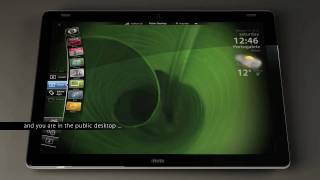
This is a concept video of a UI for tablets. The goal is that you can manage the system with your thumbs while you are holding the tablet with the two hands.
This video shows the unlock screen and the slide unlock (anonymous login).
Unlock screen
The unlock screen shows you basic info like local wheather, local time and a sliding line calendar (I believe that these must be configurable modules and that the unlock screen doesn't have to show any personal data). If you have setup a home location then, one tap over the time or the weather areas changes the info from local to home and viceversa).
The unlock screen have two sliders and both unlock the system exactly in the same way, but there are one difference. If you unlock the tablet with the left slider the system assumes that you are left handled, right handled otherwise. This way the menus fit naturally to your behaviour.
You can unlock your tablet in two ways: Slide to Unlock and Sign to unlock.
Slide unlock
When you unlock by sliding, not by signing, you access to the default public desktop. The default public desktop doesn't contains any personal data, photos, email accounts etc. No recent items are shown in the apps and there is not home location. You can browse the web, access to the public projects system, public downloads and all the media, apps, tapps and control surfaces marked as public (by default) .
Tags
View history
watch pagelist (suggested, channel, search…)
Captures with a view count: 28 (the watch page and the lists that showed the video).
Archive captures (6)
| Captured | Source | Captured URL | Original | Status | Views | Likes / dislikes |
|---|---|---|---|---|---|---|
| 2014-07-09 | Web Archive – pages captured in 2014 | youtube.com/watch?v=OS4U6ULKWs8 | available | 111,502 | 64 / 10 | |
| 2013-12-08 | Web Archive – pages captured in 2013 | youtube.com/watch?v=OS4U6ULKWs8 | available | 111,351 | 64 / 10 | |
| 2012-03-04 | CC 2012 | youtube.com/watch?v=OS4U6ULKWs8 | available | 109,753 | 64 / 10 | |
| 2011-01-25 | Web Archive – pages captured in 2011 | youtube.com//watch?v=OS4U6ULKWs8 | available | 102,139 | 56 / 9 | |
| 2011-01-21 | Web Archive – pages captured in 2011 | youtube.com//watch?v=OS4U6ULKWs8 | available | 102,040 | 56 / 9 | |
| 2010-03-11 | YouTube API 2009–2010 (ArchiveTeam crawl) | available | 80,125 |
The captured URL is the exact address of the page when it was captured, country host and parameters included. For Common Crawl it opens the record in that crawl's index (WARC file and offset), and the HTML button downloads the page's original code from Common Crawl. For the Web Archive it opens that very capture in the Wayback Machine. The date of a Common Crawl capture opens the nearest Wayback copy of the page.